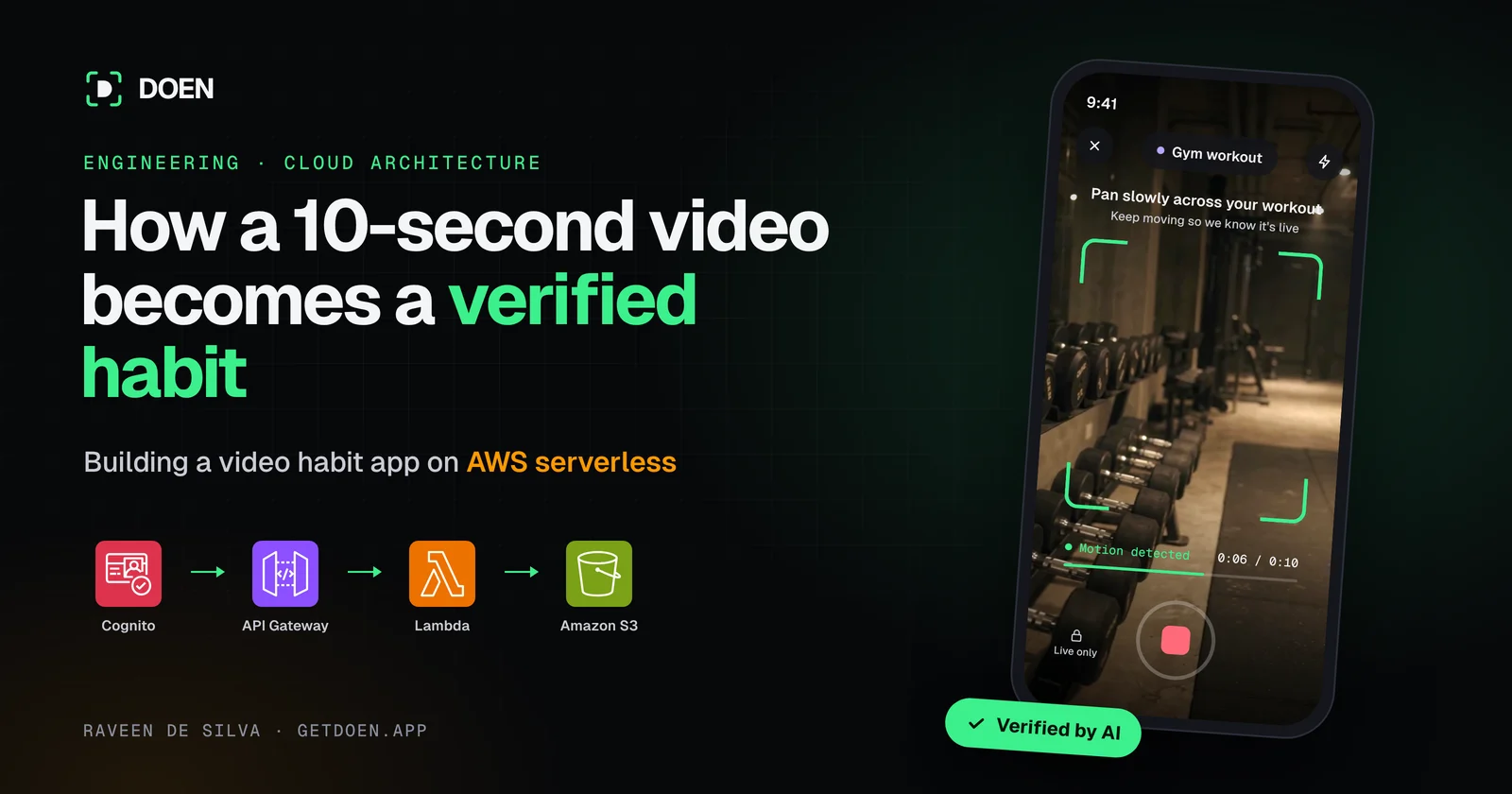
Every habit tracker I've used has the same weak spot: a checkbox. You tap it, and the app believes you went to the gym, read 20 pages or meditated. Nobody checks. After a few weeks the streak is just a number you protect, and it stops meaning anything.
So I built DOEN around one rule: you can't just say you did it, you have to prove it. Every check-in is a 10-second live video, verified by AI or by your friends. Skip once, and your friends know.
That rule sounds simple, but it changes the whole backend. A checkbox is one row in a database. A DOEN check-in is a video that has to be recorded on a phone, uploaded privately, checked by an AI model or sent to friends, and turned into a streak, all in a few seconds and at a cost a solo developer can afford.
I'm building DOEN on my own, from Sri Lanka. In this post I'll follow a single check-in from the moment you hit record to the moment your streak goes up, and show how AWS serverless lets one developer run it: no servers, no ops team, and a bill that grows only with real use. I'll explain each piece of the architecture along the way: what runs where, why I chose it, and what I'd change if I started again.
Architecture at a glance
DOEN's backend is fully serverless on AWS. Amazon Cognito handles sign-in, Amazon API Gateway and AWS Lambda run the API, and Amazon S3 stores every video. Around that core, Supabase Postgres holds app data, OpenAI verifies check-ins and Expo Push delivers notifications.
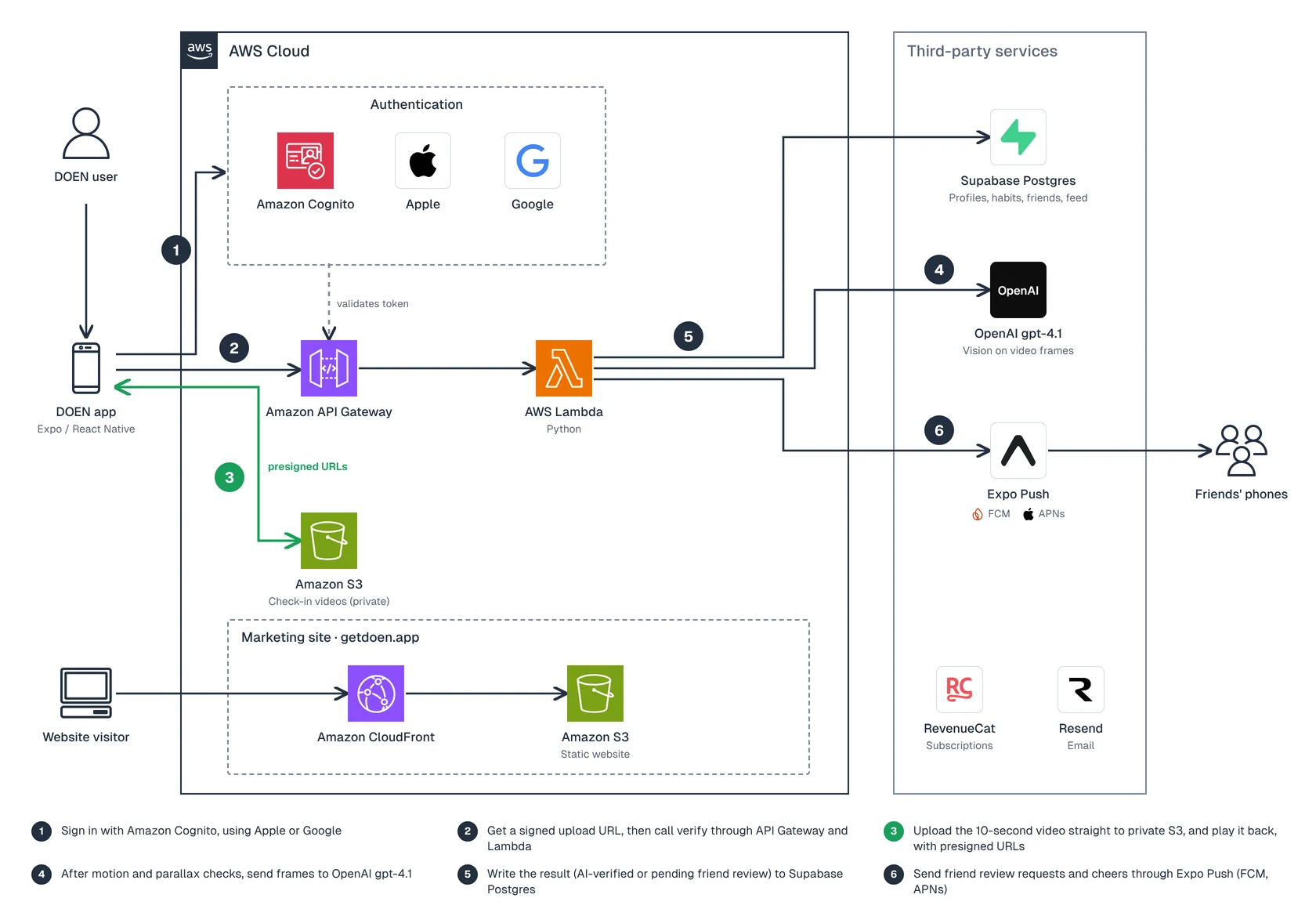
The phone talks to AWS for sign-in and API calls, and uploads video straight to a private S3 bucket. Lambda handles every request and reaches out to Postgres, OpenAI and Expo Push.
| Layer | What I use |
|---|---|
| App | Expo / React Native |
| Auth | Amazon Cognito, with Sign in with Apple and Google |
| API and compute | API Gateway + AWS Lambda (Python) |
| App data | Supabase Postgres |
| Video storage | Amazon S3, private, pre-signed URLs |
| AI verification | OpenAI gpt-4.1 vision |
| Push notifications | Expo Push (FCM and APNs) |
| Website | Static site on S3 + CloudFront |
| Subscriptions, email | RevenueCat, Resend |
| Infrastructure | Terraform |
The check-in pipeline, step by step
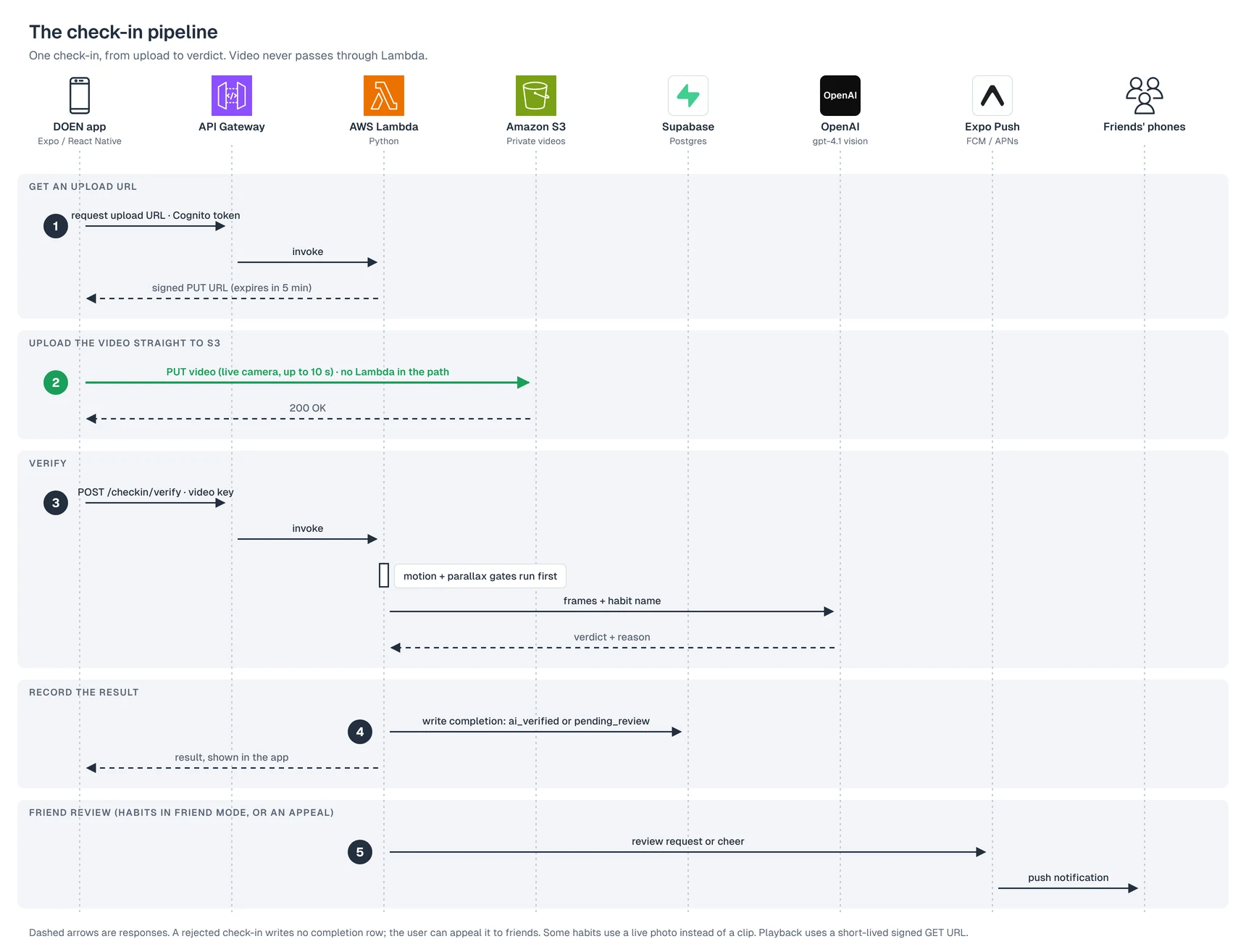
A check-in never passes through my servers as a video. The phone uploads straight to S3, and my code only handles small JSON requests. Here is the path a single check-in takes:
-
Record. The Expo app opens the live camera; there is no gallery picker. A video check-in lasts up to 10 seconds, and you can stop after about 3 seconds once you've panned the camera enough. Some habits use a live photo instead of a clip.
-
Get an upload URL. The app calls API Gateway with its Cognito token. A Python Lambda returns a signed S3 PUT URL that expires after 5 minutes.
-
Upload directly to S3. The phone sends the video straight to that URL. Lambda never touches the bytes, so there is no payload limit to fight and no compute billed while the upload runs.
-
Verify. The app calls POST /checkin/verify with the video's key, and this one call does the work. For habits verified by AI, motion and parallax checks run first, then frames from the clip go to OpenAI's gpt-4.1 vision model. For habits verified by friends, the check-in goes to them for review instead.
-
Record the result. Only after the decision does Lambda write a completion row to Supabase Postgres: ai_verified, or pending_review for friend review. A rejected check-in writes no row, and the user can appeal it to friends.
-
Update the streak. An AI-verified check-in updates the streak and progress straight away. A friend-reviewed one waits for approval. Nothing reaches the feed until the user chooses to share it.
-
Notify. Expo Push sends friends review requests and cheers. An AI verdict is shown in the app rather than sent as a push.
When anyone watches the clip later, in the feed or in a review, the API returns a short-lived presigned GET URL. Videos are never public.
AI verification: frames, not the whole video
Before the model sees anything, two cheaper checks run first: a motion gate and a parallax gate. They look for real movement and depth in the clip, which a recording of a screen or a photo struggles to fake. Only clips that pass both go to OpenAI.
The AI never watches the full 10 seconds. It looks at a handful of frames from the clip, plus the habit's name, and answers one question: does this show the person doing it?
I send frames rather than the video for three reasons:
-
Cost. Images are far cheaper to process than video, and a few well-chosen frames are enough to tell a gym from a couch.
-
Speed. Fewer inputs mean a faster answer, and a check-in should feel instant.
-
Privacy. Only the frames needed for a decision leave AWS. The clip itself stays in my private S3 bucket.
The model is OpenAI's gpt-4.1 with vision, set in config so I can swap it without a deploy. The prompt asks for a structured answer: verified or not, and a short reason.
Because the model name lives in config, I can test a newer or cheaper model on real check-ins and switch with one change.
AI verification costs about 1 to 1.5 cents per check-in ($9–$15 per 1,000), which makes it the biggest line on the bill. That's why sending a few frames instead of the full video matters so much.
Friend check and notifications
Some habits are better judged by people who know you. Each habit has a verification mode: AI or friends. In friend mode, the check-in is saved as pending review and sent to your friends, and your streak only moves once they approve it. If the AI rejects a check-in, you can also appeal it to your friends.
The friends graph, the feed and the reviews all live in Supabase Postgres. Friendships, check-ins and reviews are relational data, and SQL joins make the feed simple to build. A check-in stays private until its owner chooses to share it.
Notifications go through Expo Push. One API covers both platforms: Expo hands messages to Firebase Cloud Messaging on Android and to Apple Push Notification service on iOS. I don't use Amazon SNS. For a React Native app built with Expo, Expo Push removed a whole layer of setup.
Pushes are what make DOEN social: friends get review requests and cheers. AI verdicts appear in the app instead, so nobody is flooded with notifications.
Auth, data and privacy
I split the stack by what each piece is best at: AWS for identity, compute and private files, and Supabase for relational app data.
Sign-in with Amazon Cognito. The app uses Amplify on the client, with Sign in with Apple and Google. Every API call carries a Cognito token, and API Gateway and the Lambdas check it before doing anything. Supabase Auth exists only as a fallback for development.
App data in Supabase Postgres. Profiles, habits, friends, the feed and check-in results live in Postgres. DynamoDB is still defined in my Terraform from an earlier version, but it is no longer the main store. Postgres won because a social habit app is full of relationships, and I wanted SQL.
Videos in private S3. The bucket is not public, and there is no CDN in front of it. Uploads use a signed URL that expires after 5 minutes, and playback uses a short-lived signed URL. If someone copies a link, it soon stops working.
CloudFront for the website only. getdoen.app is a static site on S3 behind CloudFront. Check-in videos never go through it.
The rest of the stack is managed services: RevenueCat handles subscriptions across the App Store and Google Play, and Resend sends email. As a solo developer, I'd rather pay for these than build and maintain them.
Why AWS serverless is the right fit for a solo founder
Serverless is the reason one person can run DOEN. I write the product logic; AWS runs, scales and secures everything underneath it.
| AWS service | Its job in DOEN | What I don't have to do |
|---|---|---|
| Amazon Cognito | Sign-in with Apple and Google, user tokens | Build and secure my own auth system |
| Amazon API Gateway | The front door for every API call, checks the Cognito token | Run and scale a web server or load balancer |
| AWS Lambda (Python) | Upload URLs, check-ins, AI verification calls | Patch servers, size machines, pay for idle time |
| Amazon S3 | Private storage for every check-in video | Manage disks, backups or file servers |
| Amazon CloudFront + S3 | Fast, cheap hosting for website | Run a web host for the marketing site |
What that buys me, in practice:
-
Pay per request. Lambda and API Gateway bill for the requests I actually serve. While DOEN is in early access, there is no fleet of idle servers costing money overnight.
-
Automatic scaling. If a video about DOEN takes off and thousands of people check in at 7 a.m., Lambda scales out on its own. I don't get paged, and I don't pre-provision for a spike that may never come.
-
Security by default. Requests are authenticated before my code runs, videos sit in a private bucket, and each function only does one small job.
-
Built-in logs. Lambda sends its logs to Amazon CloudWatch out of the box, so I can trace a failed check-in without setting up a logging stack.
-
Infrastructure as code. Everything is defined in Terraform, so I can rebuild an environment from code instead of clicking through the AWS console.
The design also keeps Lambda cheap on purpose. Functions only handle short JSON requests: issuing upload URLs, saving check-ins, calling OpenAI and writing results. The heavy part, moving video, goes straight between the phone and S3. That one pattern, presigned URLs, is the best serverless decision in the stack.
The cost that grows fastest is not AWS. It is AI verification, which scales with every check-in. That is why the frame-sampling and model-in-config choices matter more to my bill than any server setting.
What it actually costs. At current usage, the whole stack runs on roughly $0–$3 a month. Here's the cost per 1,000 check-ins:
| Part of the stack | Cost per 1,000 check-ins |
|---|---|
| AWS (Cognito, API Gateway, Lambda, S3) | about $1 |
| Supabase Postgres | $0 |
| OpenAI gpt-4.1 vision | $9–$15 |
| Total | about $11–$16 |
OpenAI is about 90% of the variable cost. AWS stays near $1 because video never touches the API servers: it goes straight from the phone to S3, so Lambda only pays for small, fast requests.
What I'd do differently
Pick one database earlier. I started with DynamoDB and moved app data to Supabase Postgres. The DynamoDB tables are still in Terraform. Choosing the store that fits the data, here relational, on day one would have saved a migration.
Pick one auth path. Cognito is the production path, and Supabase Auth is a fallback. Two systems for one job means more to test. If I started again, I'd commit to one.
Keep heavy data off compute from the start. Presigned S3 uploads were the best decision in the stack. Any feature that moves files should begin there.
Try it
If you're a solo founder with an idea that needs real infrastructure, AWS serverless is how you ship it without becoming a full-time sysadmin. Start with Cognito, API Gateway, Lambda and S3, keep heavy data off your functions, and add pieces only when the product needs them.
DOEN is launching soon on iOS and Android. If you want a habit tracker you can't fake, join the waitlist at getdoen.app. I'm building in public on YouTube, Instagram and TikTok (@getdoen.app), and I'm happy to answer questions about the stack.